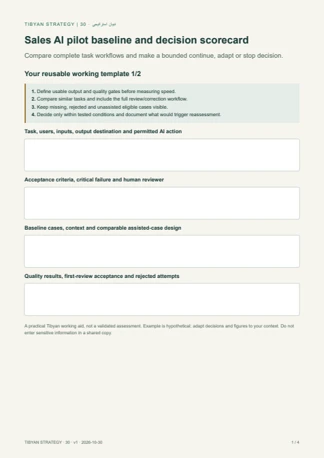
Tibyan Toolkit 30
Sales AI pilot baseline and decision scorecard
Compare complete task workflows and make a bounded continue, adapt or stop decision.
PDF · 4 pages · 69 KB · Version 1
Download English PDF Open editable working template ↗Allocate sales work according to the uncertainty, consequences, and people who can verify the answer.

A buyer arrives with an AI-generated vendor comparison. It marks three integrations as available and ranks solutions by projected savings. The salesperson adds value by making the comparison checkable, especially where a claim would change scope or spending.
Give the comparison table a highlighter test. Mark the row that could change the purchase if it were wrong. Ask who can verify that claim and what evidence they can show the buyer.
In this fictional software evaluation, ask the buyer which item matters to the decision. One listed integration may require a connector the buyer cannot use. Check the exact environment with both technical leads. If savings estimates assume that capacity becomes cash, trace the assumption to a payment that could change. NIST’s generative AI profile identifies confidently erroneous output and over-reliance as risks. Treat a generated comparison as a set of claims to verify. NIST, Generative AI Risk Management Profile
| Task | Appropriate use of AI on permitted inputs | Human responsibility |
|---|---|---|
| Organize documented requirements | Group public or approved statements and preserve source references. | Confirm the requirement list and settle conflicting definitions with the buyer. |
| Compare integration claims | Flag conditions and evidence gaps in a verified set of documents. | Technical owners confirm fit and test the consequential exception in context. |
| Decide whether to commit | Assemble options and unresolved assumptions. | Authorized buyer and seller owners judge trade-offs and agree any commitment. |
Choose the smallest helpful contribution. If your buyer already built a credible comparison, identify one claim you can verify with a source or controlled test. If a claim remains unknown, make it visible and agree who can resolve it. Use approved data sources and tools and leave sensitive information within the buyer’s agreed handling arrangements.
Track the whole task, from collecting evidence to reviewing the output. For the integration comparison, ask a reviewer to count factual corrections and unresolved assumptions, alongside the time spent checking. A fast summary can create extra work if it mixes product versions or omits configuration conditions. A verified summary can still be suitable for a low-consequence preparation task even if the buyer’s deployment decision needs an additional test. Decide which use you are evaluating before you compare results.
Suppose an AI summary says the buyer’s dispatch system has a standard connector, while the technical lead says the local installation is customized. Map drafting, source checking, a representative test and final acceptance. A good allocation gives the AI work that can be independently checked and gives acceptance to a person who can inspect the environment and owns the decision.
Review your map against three questions. What remains uncertain? What happens if the answer is wrong? Who can verify it or give authority to act?
Use the sales AI scorecard to compare the full workflow, including the time and evidence needed for human review. Sales AI pilot baseline and decision scorecard
Take the next step
Free downloads. No registration. Each PDF includes instructions, an illustrative example and a reusable worksheet.
Tibyan Toolkit 30
Compare complete task workflows and make a bounded continue, adapt or stop decision.
PDF · 4 pages · 69 KB · Version 1
Download English PDF Open editable working template ↗Practical worksheets, not validated assessments. Adapt the task and timing to your context. See each PDF for its revision date.
Explore the tools & toolkits library ↗
Practical perspective
Prepare a B2B quotation that procurement, finance, and operations can assess. Use Tibyan’s QUOTE Framework, an annotated example, and a 13-point checklist.
Read perspective
Talent Development
Check whether the task still matters, how people learn it and what gets in their way before you keep, redesign or retire a course.
Read perspective
Team development
Follow one customer case across teams and find which handoff lost the facts, ownership or promise.
Read perspective